Best Linktree Alternatives for Creators in 2026 (Honest Comparison)
Every 'best Linktree alternatives' list is written by someone who's never built a creator tool. This one's different. We built Coreli because none of the alternatives solved the real problem. Here's an honest look at what's out there and what's actually worth switching to.

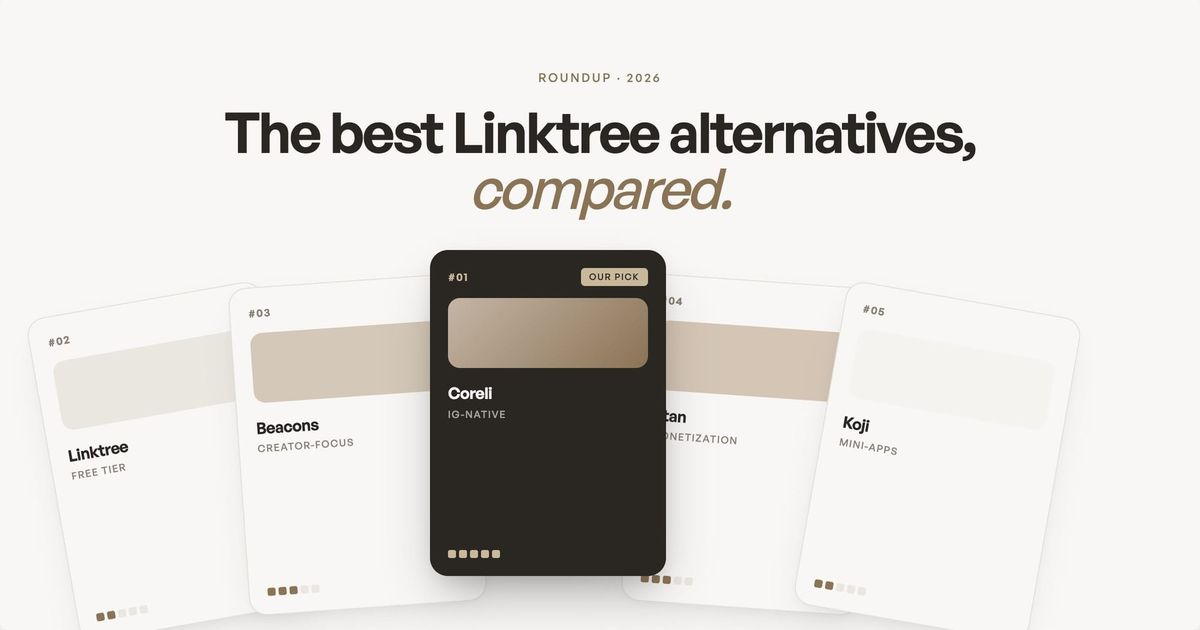
Every link-in-bio tool looks the same. That's the problem.
TL;DR
The best Linktree alternatives for creators in 2026 depend on what you actually need. Linktree works for simple link lists, but if you need brand-matched design, affiliate integration, or commerce, there are better options. Stan Store wins for digital product sales ($29/month, checkout on-page). Beacons wins for all-in-one features (free tier with email, store, and AI media kit). Carrd wins for total design control ($19/year). Coreli wins for matching your Instagram aesthetic automatically ($29/month). Pick based on what you're trying to accomplish, not what everyone else uses.
Key takeaways on Linktree alternatives for creators
- Linktree is the default for a reason, but it's not always the best fit. The right tool depends on whether you prioritize design, conversion, or feature depth.
- Beacons is the strongest all-in-one for creators who want links, email, products, and analytics in one dashboard.
- Stan Store wins for creators selling digital products, courses, or coaching directly to their audience.
- Carrd offers the most design freedom at the lowest price ($19/year), but you build everything from scratch.
- Coreli generates an AI-built landing page from your Instagram so the page matches your aesthetic without manual design work.
- Switching tools is fast (under 30 minutes) and rarely costs traffic if you keep your most important links in the same relative position.
You've spent years building an Instagram presence that feels distinctly yours. The colors, the aesthetic, the way you present yourself. Then you put a Linktree in your bio and every visitor lands on the same white page with the same rounded buttons that every other creator uses.
Linktree works. It's simple, it's fast, and over 70 million people use it. But if you're reading this, you've probably hit at least one of its ceilings: the design doesn't match your brand, the analytics are basic, the page feels generic, or you want your link-in-bio to actually do something beyond redirect people to other places.
Before we get into alternatives, it's worth noting that Instagram now supports up to five links directly in your bio. For creators who only need a handful of links, this native feature might be all you need. But if you want a branded landing page, affiliate integration, analytics, or any kind of design beyond a plain list, you'll still need a dedicated tool.
Most "best Linktree alternatives" articles are written by review sites that have never used the tools they recommend. They list 15 options with identical feature bullets and call it a day. This is different. We built Coreli because we couldn't find a tool that solved the core problem: creators deserve a link-in-bio that looks as good as the content they create. So we're biased, and we're going to be upfront about that. But we're also going to be honest about where every tool (including ours) wins and loses.
What should you look for in Linktree alternatives for creators?
Before comparing tools, it helps to know what separates a good link-in-bio (the standalone landing page Instagram visitors see after tapping the link in your bio) from a great one in 2026. The landscape has moved beyond simple link lists, and our complete guide to creator landing pages covers the full strategy. Here's what matters:
- Design that matches your brand. Not just theme colors and fonts, but layout flexibility. Can the page feel like a real website rather than a list of buttons? Can visitors get a sense of who you are within 3 seconds of landing? (We wrote a deep-dive on why your link in bio needs to match your brand aesthetic.)
- Mobile-first experience. Instagram app usage is roughly 96% mobile. Your link-in-bio page needs to load fast in Instagram's in-app browser, look right on every phone, and have tap targets that actually work with a thumb.
- How it handles your revenue streams. If you earn through affiliate links (ShopMy, LTK, Amazon), your page should display them with context and visual weight, not just as another button in a list. If you sell products or collect emails through other platforms (Stan Store, Substack, Flodesk), your link-in-bio should make those destinations feel intentional and on-brand, not like a random link dump. Some tools build commerce directly into the page. Others focus on presenting your existing revenue streams beautifully. The right approach depends on how you monetize. If affiliate revenue is part of your strategy, our guide to setting up affiliate links for Instagram creators covers the full setup.
- Analytics that tell you something useful. Click counts are table stakes. What you really need is which links drive revenue, where your traffic comes from, and what content your audience engages with most.
The alternatives, honestly reviewed
Linktree (the incumbent)
Linktree is the default for a reason. Setup takes 60 seconds, the free plan is genuinely usable, and the interface is clean. Paid plans run from $8/month (Starter) to $35/month (Premium), with the main upgrades being custom branding, email collection, and analytics. In 2025-2026, Linktree expanded well beyond links, adding social media scheduling, AI-powered caption writing, automated DM responses, and a Community.com integration for building subscriber communities directly from your page.
Where it wins: Simplicity and ecosystem. If you need a page with 5 links and nothing else, Linktree does that better than anyone. The brand recognition also helps since visitors know what a Linktree looks like and trust it. The newer scheduling and DM features mean you can manage more of your social workflow without leaving the platform.
Where it falls short: Design flexibility is limited. Even on paid plans, you're working within Linktree's template structure, which is fundamentally a list of buttons. If you sell digital products through Linktree Commerce, the free plan takes a 12% seller fee on every transaction (on top of Stripe processing), and both Starter and Pro charge 9%. Only the $35/month Premium plan drops to 0%. The aesthetic is also increasingly generic since millions of pages look identical.
Best for: Creators who just need a simple, reliable link hub and don't care about standing out visually.
Beacons
Beacons has positioned itself as the all-in-one creator platform. It goes well beyond links, offering an AI-generated media kit, email marketing, a digital storefront, audience analytics, and an AI teammate called Beam that helps with content strategy, audience insights, and brand deal outreach. The free plan includes unlimited links and a digital store (with a 9% transaction fee), and paid plans start at $10/month (Creator). To drop transaction fees to 0%, you'll need the Creator Plus plan at $30/month. A Creator Max plan at $90/month adds white-glove support and Google Workspace.
Where it wins: Feature depth. If you want one tool that handles your link-in-bio, email list, product sales, and brand outreach, Beacons packs more into its free tier than most competitors' paid plans. The AI media kit that auto-generates from your social stats is genuinely useful for pitching brands, and the AI brand outreach tool automates the tedious process of finding and messaging potential sponsors.
Where it falls short: The page design still feels templated. You get more customization than Linktree, but the layouts don't break far enough from the "stack of cards" format. And the sheer number of features can feel overwhelming if you just want a clean, beautiful page.
Best for: Data-driven creators who want to manage their entire business from one dashboard and don't mind a learning curve.
Stan Store
Stan Store is built for creators who sell. Digital products, courses, coaching calls, paid community access. The entire interface is designed around reducing the number of clicks between a follower seeing a product and buying it. The Creator plan starts at $29/month with 0% platform transaction fees (Stripe processing still applies). Creator Pro at $99/month adds email marketing, funnels, upsells, discount codes, and affiliate tools. No free plan, but there's a 14-day trial.
Where it wins: Conversion. Stan Store's checkout flow is dramatically faster than most competitors because the purchase happens on the page, not through a redirect to Shopify or Gumroad. If you sell digital products and your primary goal is revenue, this is the most optimized tool for that job. The AutoDM feature (send purchase links automatically when someone comments a keyword) is a strong conversion driver.
Where it falls short: It's a store first and a link-in-bio second. If you're not selling products, Stan Store is overkill. The design is also commerce-focused, which can make your page feel more like a shop than a personal brand destination. No custom domain support.
Best for: Creators whose primary revenue is digital product sales, courses, or coaching.
Milkshake
Milkshake takes a different approach entirely. Instead of a list of links, it lets you build a mini-website as a series of swipeable "cards" on mobile. The design is Instagram-native, and the whole creation process happens in the app on your phone.
Where it wins: Mobile creation experience. If you want to build your link-in-bio on your phone in 10 minutes, Milkshake makes that feel natural. The card-based design also stands out from every other list-based tool.
Where it falls short: The card format limits what you can include on each "page." It's harder to display a lot of links or products in an organized way. The tool is also focused on mobile-first creation, so if you want to edit on desktop, the experience is limited.
Best for: Mobile-first creators who value aesthetic and want something that feels different from a typical link page.
Carrd
Carrd is technically a one-page website builder, not a link-in-bio tool, but creators have been using it for exactly that purpose for years. Pro plans start at just $9/year for Pro Lite (no custom domains) or $19/year for Pro Standard (includes custom domains), making it by far the cheapest option on this list. You get complete design control: custom layouts, fonts, backgrounds, animations, and embedded content.
Where it wins: Total design freedom at an unbeatable price. If you know what you want your page to look like and have the skills (or patience) to build it, Carrd lets you create something completely unique. Custom domain support is included on Pro Standard and above.
Where it falls short: It's a builder, not an automated tool. You design everything from scratch, which means you need an eye for design and time to invest. There's no integration with Instagram, no automatic content pulling, and updates are manual. For busy creators, this becomes a chore.
Best for: Design-savvy creators who want a fully custom page and are willing to build and maintain it themselves.
Later's Linkin.bio
Later is primarily a social media scheduling tool, and Linkin.bio is its link-in-bio feature. The unique angle: your link page mirrors your Instagram grid, and each post in the grid links to its own destination. Followers tap a post and go directly where you want them.
Where it wins: Grid-based navigation is intuitive for Instagram users. It's also bundled with Later's scheduling tools, so if you're already paying for Later, you get this included.
Where it falls short: It's tied to Later's ecosystem. If you don't use Later for scheduling, paying for it just for Linkin.bio doesn't make sense. The grid layout also limits your ability to feature non-Instagram content (newsletters, products, affiliates).
Best for: Creators already using Later for scheduling who want a grid-style link page.
Coreli
This is ours, so take this section with the appropriate grain of salt. Coreli generates an editorial-style landing page from your Instagram handle. Instead of starting with a template and adding content, it analyzes your posts, aesthetic, and brand voice, then builds a page that looks like a designer made it for you. You customize from there.
Where it wins: Design quality and speed. The generated page looks like a mini-website, not a link list. It includes your hero image, featured content, reels, links, and (if you use ShopMy) your shoppable outfits, all arranged in a layout that matches your visual brand. If you use LTK, you can add your LTK content through the custom link feature in the Media section. The whole process takes about 30 seconds to generate and 15-20 minutes to customize. At $29/month, it's priced at the same level as Stan Store and below Linktree's Premium plan.
Where it falls short: It's newer and smaller. Linktree has 70 million users and years of integrations. Coreli has hundreds. Custom domains aren't available yet. It doesn't have built-in email collection or a digital product store, so if you need those, you'll still link out to dedicated tools. And if you don't have an Instagram presence, the generation flow doesn't have much to work with.
Best for: Multi-hyphenate creators with a strong Instagram aesthetic who want their link-in-bio to match the quality of their content, without building it from scratch.
Which of these Linktree alternatives for creators should you actually use?
Skip the feature comparison spreadsheet. Start with what you're trying to accomplish:
- If you just need links and nothing fancy: Linktree's free plan. It works, it's trusted, and it's free. Or just use Instagram's native 5-link bio feature if that's enough.
- If you sell digital products or courses: Stan Store. The checkout experience is built for conversion and nothing else comes close for commerce.
- If you want one platform for everything (links, email, products, analytics): Beacons. The feature breadth is unmatched, especially on the free tier.
- If you want total design control and don't mind building it yourself: Carrd. At $19/year, the price can't be beaten.
If your Instagram aesthetic matters and you want your page to reflect it automatically: Coreli. Enter your handle and see what it generates. If it captures your brand, you'll know in 30 seconds.
Making the switch without losing traffic
Changing your link-in-bio tool feels like a big deal, but it's actually one of the easiest migrations you can make. You have one link in your Instagram bio. You change it. That's the whole migration.
A few things to do before you switch:
- Check your current analytics. Before you leave Linktree (or whatever you're using), screenshot your click data. Which links get the most taps? This tells you what to prioritize on your new page.
- Keep your most important links in the same relative position. If your followers are used to your newsletter signup being the first thing they see, keep it prominent on the new page too. Changing tools is fine. Changing the user experience too dramatically can confuse repeat visitors.
- Update everywhere, not just Instagram. Your bio link lives in your TikTok profile, your Twitter/X bio, your YouTube description, your email signature, your newsletter footer. Update all of them at once.
- Test on your phone first. Before you swap in the new link, open it in Instagram's in-app browser. Tap every link. Make sure everything works the way you expect on mobile, because that's where the vast majority of your traffic will see it.
How do Linktree alternatives for creators compare on advanced analytics?
Most basic link-in-bio tools count clicks and stop there. Advanced analytics show you not just what visitors clicked, but who they were, where they came from, and how much they converted. The right tool depends on how much you need to know.
- Beacons: Full analytics dashboard on free tier. Click breakdown by source, referrer, and time. Conversion tracking on paid plans.
- Stan Store: Built-in product and offer analytics. Tracks every checkout, average order value, and lifetime value per buyer.
- Linktree: Click totals on free tier. Click-source breakdown, audience demographics, and engagement metrics require Pro ($8/month).
- Coreli: Click analytics per section and per product, plus visitor-source tracking, all on the free tier.
- Carrd: No native analytics. You add Google Analytics, Plausible, or Fathom yourself.
If you're earning real money from affiliate links, real analytics matter more than aesthetics. The creators who treat their link-in-bio as a measurable funnel grow revenue faster than the ones who treat it as a vanity page.
Which Linktree alternatives for creators help with SEO and retargeting?
Most link-in-bio tools weren't built for SEO. But a few are quietly useful because they let search engines index your page properly and they let you fire retargeting pixels on visitors who land but don't click.
- Custom domains. Beacons, Linktree Pro, Stan Store, and Coreli all let you map a custom domain (e.g., yourname.com), which earns more domain authority than a shared subdomain.
- Meta tags. Beacons, Carrd, and Coreli let you set page title and meta description, which controls how the page shows up in Google.
- Pixel firing. Beacons Pro and Stan Store let you install Meta Pixel and TikTok Pixel to retarget visitors with paid ads later.
- Indexable text. Linktree, Beacons, Carrd, and Coreli render text in real HTML. Some Linktree templates render headings inside images, which search engines and AI Overviews can't read.
- Schema markup. Most tools don't ship JSON-LD by default. If schema matters to you, Carrd or a custom build gives you the most control.
Professional perception: what your choice of Linktree alternative signals
This is the soft factor most comparison articles skip. Brands looking to partner with you, journalists checking your work, and recruiters evaluating your profile all open your link in bio at some point. What they see informs whether they reach out.
A bare Linktree page with a stack of buttons reads as casual or amateur. A branded landing page on a custom domain reads as a creator running a business. Neither is right or wrong, but the choice matters depending on the brand partnerships you want and the rates you can charge.
Frequently asked questions
What are the SEO advantages of using Linktree alternatives?
Tools that support custom domains, editable meta tags, and indexable text (rendered in HTML rather than images) help your page rank for branded searches like your name plus your niche. Beacons, Stan Store, Carrd, and Coreli all support custom domains; Linktree requires its Pro plan ($15/month). The SEO upside is incremental, not transformational, but it costs nothing once you're already using the tool.
How do Linktree alternatives for creators support retargeting?
Retargeting requires a pixel (Meta Pixel, TikTok Pixel, Google Tag) that fires when a visitor loads your page. Beacons Pro, Stan Store, and Carrd support pixel installation directly. Linktree's free tier doesn't, but Pro does. If you run paid ads or plan to, pixel support is a non-negotiable feature.
What are the drawbacks of using multiple Linktree alternatives at once?
You can only have one link in your Instagram bio, so multiple tools usually means one primary link plus secondary landing pages linked from posts, emails, or other channels. The risk is fragmented analytics (you can't see the full visitor journey across tools) and inconsistent branding. Most creators are better served by picking one tool and making it the source of truth than by stitching multiple together.
What is the best free Linktree alternative?
Beacons offers the most features on a free plan: unlimited links, a digital store (9% transaction fee), AI media kit, and email marketing. Linktree's free plan is simpler but more limited.
Is Linktree worth paying for?
Linktree's free plan works for basic link lists. Paid plans ($8-35/month) add custom branding, analytics, and scheduling. But if you need design flexibility or commerce, alternatives like Stan Store or Coreli may be better value.
Can I use multiple link-in-bio tools?
You can only have one link in your Instagram bio, so you'll use one tool as your primary. But you can link to a Stan Store product page or LTK shop from within your main landing page tool.
Your link-in-bio is one of the few pieces of internet real estate you fully control. Your Instagram posts live and die by the algorithm. Your content can be demonetized, shadowbanned, or buried. But your link page? That's yours. Make it count.