How to Set Up Affiliate Links for Instagram Creators (2026 Guide)
Most creators set up affiliate links wrong and leave money on the table. Here's how to set up ShopMy, LTK, and Amazon links on Instagram the right way, plus how to automate the whole process.

Affiliate links on Instagram: you're probably leaving money on the table
Last updated: May 2026. All commission rates and platform features verified at time of writing.All commission rates and platform features verified at time of writing.
TL;DR
The way you set up affiliate links for Instagram creators determines whether you get paid. Always generate links through the platform's official tool (never copy browser URLs), use deep links for mobile, and never run affiliate URLs through generic link shorteners. Start with one platform (ShopMy for premium fashion/beauty, LTK for app-based discovery, Amazon for broad product range), set up DM automation with ManyChat, and track your earnings per click weekly.
Here's what nobody tells new creators setting up affiliate links for Instagram creators: the way most people set up their affiliate links matters more than they think. Not because they picked the wrong products or tagged the wrong audience. Because the technical setup determines whether you actually get paid.
If you've been sharing affiliate links on Instagram and wondering why your commissions don't match your effort, the problem might be in your infrastructure, not your content. And if you're just getting started with affiliate marketing on Instagram, this guide will save you months of trial and error by setting things up right from day one.
We're going to cover the three platforms that matter most for Instagram creators (ShopMy, LTK, and Amazon Associates), how much you can realistically earn, how to generate links that work on mobile, where to put them for maximum conversions, and how to track what's actually working.
Which affiliate link platform should you choose?
The biggest mistake new affiliate creators make is signing up for every platform at once. You end up with links scattered across three dashboards, no clear sense of what's converting, and a link-in-bio page that looks like a classified ad. Start with one platform, learn it well, then expand.
Here's how to choose:
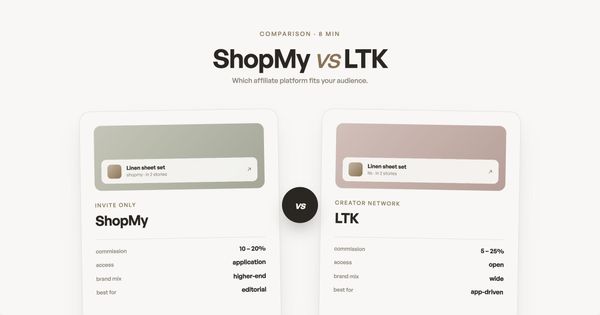
ShopMy is where most fashion, beauty, and home creators are moving. Commissions typically range from 10-30% depending on the brand, the interface is built for creators who care about aesthetics, and payouts hit your account every Friday via PayPal or Stripe. The dashboard shows you exactly which clicks convert and which brands are viewing your profile.
LTK (LikeToKnowIt) is the original creator commerce platform for fashion and lifestyle creators with an established following. LTK has its own shopping app with over 40 million monthly shoppers who browse creator recommendations directly. Commission rates average 16% but range from 5-25% depending on the brand and category. The catch: you need at least 5,000 engaged followers to apply, and payouts run on a biweekly cycle with a 60-90 day commission window.
Amazon Associates is the catch-all, and with good reason: it's used by roughly 58% of all affiliate marketers, making it the most widely adopted network. Almost everything is on Amazon, the checkout process is trusted, and the cookie window means you earn commissions on anything a shopper buys within 24 hours of clicking your link, not just the product you linked.
A quick decision framework: if you're primarily fashion/beauty and your audience shops premium, start with ShopMy. If you're fashion/lifestyle with a larger following and want app-based discovery, go LTK. If you recommend products across many categories or you're just starting out, go Amazon. You can (and should) eventually use all three, but pick one to master first.
At Coreli, we work with creators who use ShopMy, LTK, and Amazon daily, and the setup patterns in this guide come from watching what actually converts. The data backs this up: according to InfluenceFlow's 2026 creator earnings research, a micro-creator with just 8,000 followers and a 6% engagement rate earned $1,200 per month through Instagram Shop affiliate alone. That's not a mega-influencer number. That's what's possible with a small, engaged audience and properly set up affiliate links.
How much do Instagram creators earn from affiliate links?
This is the question everyone wants answered but most guides dodge with "it depends." The honest answer is that earnings vary enormously based on niche, engagement, and how consistently you create content that drives clicks. But here are real numbers from affiliate marketing across the creator economy.
According to Marketing LTB's affiliate industry analysis, creator-driven affiliate revenue reached $1.1 billion in 2024, up 93% from $530 million in 2021. Affiliates with 50,000-100,000 followers on Instagram had the highest click-to-order conversion rate at around 0.9%. Micro-influencers with 10,000-50,000 followers can earn $1,000-$5,000/month across all income streams including affiliates, brand deals, and digital products.
One thing that makes affiliate income different from brand deals is the compounding effect. Industry data shows that micro and nano-influencers with 10K-100K followers are growing 25% annually and command 88% of consumer trust, making smaller creators increasingly valuable in the affiliate space. As you build a library of content, your Highlights, your link-in-bio, and your older posts keep earning while you sleep. A Story from three months ago that's saved to a Highlight still drives clicks every day.
Engagement rate matters more than follower count. Micro-influencers with 10K-50K followers average a 3.8% engagement rate compared to 1.7% for larger accounts with 100K-1M followers. That higher engagement translates to more link taps and more conversions per follower. A creator with 5,000 highly engaged followers in a high-value niche can absolutely out-earn a creator with 50,000 disengaged ones.
How to set up affiliate links that actually work on Instagram
This is where most guides get vague. They say "share your affiliate link" without explaining the technical details that determine whether you actually get paid. Here's what matters:
Always use the platform's link generator, never copy a URL from the browser. When you find a product on ShopMy, LTK, or Amazon and copy the URL from your browser's address bar, you're getting a generic link with no affiliate tracking attached. You need to use the platform's built-in link creation tool, which embeds your unique affiliate ID and tracking parameters. On ShopMy, use the "Share" button on any product page or the Snapshop browser extension to convert any URL into a commissionable link. On LTK, use the link generator in your creator dashboard. On Amazon, use the SiteStripe toolbar that appears at the top of any Amazon page when you're logged into Associates.
Use deep links (URLs that open directly in a specific app rather than a browser) when possible. When someone taps an affiliate link on Instagram and it opens in a mobile browser instead of the shopping app, conversion rates drop significantly. LTK handles this automatically (their links open the LTK app if installed). For Amazon, use the Amazon Associates mobile app to generate links optimized for mobile. ShopMy links are already mobile-optimized and route through their tracking system correctly.
Never use a generic link shortener on affiliate links. Running your ShopMy or LTK link through bit.ly or TinyURL can strip the tracking parameters that tell the platform you referred the sale. If you want shorter links, use the shortening tools built into each affiliate platform. ShopMy gives you clean shopmy.us/yourname links. LTK provides liketk.it shortened links. Amazon has amzn.to short links via SiteStripe.
Where to put your affiliate links on Instagram
Instagram gives you several surfaces to share links, and each one converts differently.
Instagram's creator monetization tools give you multiple surfaces for affiliate links. Each placement has different conversion characteristics, and the best creators use a combination of all of them.
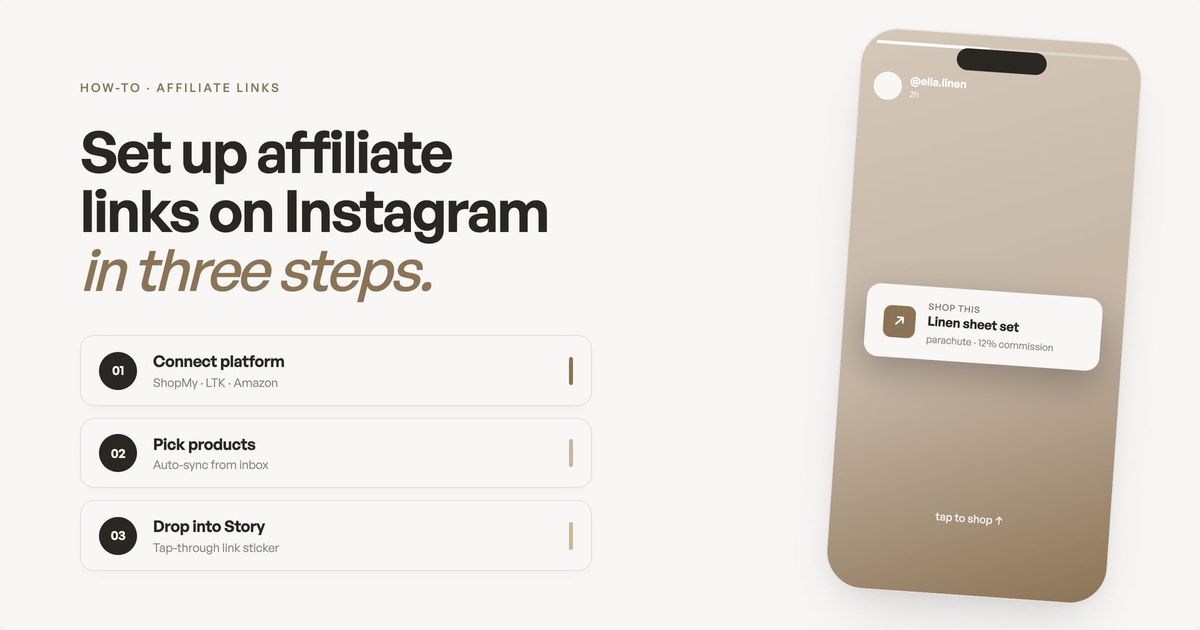
Stories are your highest-converting surface. The link sticker in Stories is the most direct path from recommendation to purchase. Your follower sees the product in context (you wearing it, using it, reviewing it), taps the sticker, and goes straight to checkout. For maximum taps, place the link sticker in the lower-center of the screen (the thumb zone), customize the sticker text to say something specific like "Shop this dress" instead of the default "Link", and always pair it with a clear verbal or text CTA in the Story itself. Adding interactive elements like polls can boost engagement by around 20%.
Save your best Story links as Highlights. Stories disappear after 24 hours, but Highlights live on your profile permanently. Create category-based Highlights (Home Favorites, Outfit Links, Beauty Routine) so followers can find your recommendations long after the original Story expires. This turns your profile into a browsable catalog of your affiliate content.
Reels are where new audiences find you, and how you handle the affiliate link matters. Instagram now lets creators tag products directly in Reels in some regions, and that's the highest-converting in-content option. If product tagging isn't available for your platform (ShopMy or Amazon, typically), the next-best move is a ManyChat keyword automation (a tool that DMs your affiliate link to anyone who comments a specific word on the Reel). DM automation turns Reels into a direct-conversion surface, not just top-of-funnel content, because the link arrives in a private conversation right after the viewer asked for it. A pinned comment with the link is the lowest-friction fallback, but it's not tappable on mobile, so conversion is much lower than the other two options.
Your link-in-bio is the hub. This is where all your affiliate content lives permanently. The problem is that most link-in-bio tools treat affiliate links as just another button in a list. Your highest-converting products get the same visual weight as your podcast link and your email signup. A better approach: use a landing page that showcases your affiliate products with context (images, descriptions, categories) rather than a flat list of links. This is one of the things we built Coreli to solve. If you use ShopMy, your outfits sync automatically to your Coreli page through our direct integration. If you use LTK, you can add your LTK content through the custom link feature in the Media section. Either way, your affiliate links are displayed in a curated, editorial layout that matches your Instagram aesthetic, not as generic buttons.
How to add affiliate links to Instagram Reels
Reels are where discovery happens on Instagram in 2026, and affiliate links in Reels work differently from Stories. You can't add a tappable link sticker directly to a Reel. Instead, you have three options for getting affiliate links in front of Reels viewers, ranked from highest to lowest converting based on the placement table above.
Option 1: Tag products directly in Reels
If you're part of the Instagram affiliate program or connected through a platform like LTK, you can tag products directly in your Reel. Viewers see a shopping bag icon at the bottom of the Reel. Tap it, and the tagged products appear with your affiliate tracking attached. This is the highest-converting method because the link lives inside the content itself.
Option 2: Use ManyChat DM automation to deliver the link
Set up a ManyChat keyword automation tied to your Reel. In the caption, ask viewers to comment a specific word (e.g., "Comment OUTFIT for the link"). When someone comments that keyword, ManyChat sends them your affiliate link directly in DMs. This is the highest-converting fallback when in-Reel product tagging isn't available for your platform (ShopMy and Amazon don't support direct Reel tags in most regions). DM-delivered links convert dramatically better than pinned comments because the viewer explicitly asked for the link and it arrives as a tappable URL inside a private conversation, not as copy-paste text below the caption.
Option 3: Drive to your link in bio
Use a CTA in your Reel's caption or on-screen text ("Link in bio for the full product list") to send viewers to your landing page. This works best when you're featuring multiple products in a single Reel. Your landing page should have the specific products featured in the Reel near the top so visitors find them immediately.
Reels vs Stories for affiliate links
Stories give you a tappable link sticker that drives direct clicks. Reels give you reach and discovery. The conversion path is different: Stories convert immediately (tap, buy), Reels can drive direct conversion when paired with product tagging or ManyChat DM automation, or build awareness over time when the call to action sends viewers to your link-in-bio. Most successful affiliate creators use both: Reels to reach new audiences, Stories to convert warm followers.
Affiliate links in feed posts and carousels
Feed posts and carousels don't support tappable links in captions. Your options are product tagging (same as Reels, if available through your affiliate platform), a ManyChat DM automation triggered by a keyword in the comments (highest converting after tagging), a CTA driving to link in bio, or a pinned comment with the link as a last resort. Carousels work especially well for roundups ("5 kitchen tools under $30") where each slide features a different product, with all affiliate links collected in your bio or pinned comment.
Comparing affiliate link placements
| Placement | Link type | Best for | Conversion |
|---|---|---|---|
| Story link sticker | Tappable, direct | Single product, time-sensitive | Highest |
| Story DM automation | Viewer replies to Story, gets link via DM | Time-sensitive affiliate offers | Highest |
| Reel product tag | In-content shopping tag | Discovery, new audiences | High |
| Reel/feed DM automation | Comment keyword, get link via ManyChat | Any affiliate link, any post format | High |
| Reel pinned comment | Not tappable (copy/paste only) | ShopMy/Amazon links on Reels | Low |
| Link in bio | Landing page hub | Multiple products, evergreen | Medium |
| Feed/carousel caption | CTA to bio (no direct link) | Roundups, educational content | Lower |
How does DM automation work for affiliate links?
One of the highest-converting strategies for affiliate creators is DM automation (automated direct messages triggered by keywords in comments). Instead of hoping followers tap your link sticker or visit your bio, you tell them to comment a keyword and automatically send the affiliate link to their DMs.
The workflow looks like this: you post a Reel or Story showing a product. You say "Comment OUTFIT to get the link." When someone comments that keyword, a tool like ManyChat automatically sends them a DM with your affiliate link. The conversion rates on DM-delivered links are dramatically higher than bio links because the person explicitly asked for it, the link arrives in a private conversation (no distractions), and they can tap it immediately without navigating away from Instagram.
To set this up, create a ManyChat account (free for up to 1,000 contacts), connect it to your Instagram, and create an automation triggered by a specific keyword comment. In the automated DM, include your affiliate link and a brief, personal message. Keep it warm and on-brand, not salesy.
Tracking your affiliate link performance
Posting affiliate links without checking your numbers is like running a store without a cash register. You need to know what's working, what's not, and where to focus your energy.
Every affiliate platform has a dashboard. The three numbers that matter most are:
Click-through rate (CTR). This tells you how compelling your content is. For Instagram Stories, link sticker CTR typically ranges from 0.5-3%, with anything above 1% considered solid performance. If you're consistently below 0.5%, your CTA likely isn't strong enough or the product isn't resonating with your audience.
Conversion rate. This is the percentage of people who click your link and actually buy. You can't control this entirely since it depends on the retailer's website experience, product price, and checkout flow. But you can influence it by linking to products you genuinely use and recommend (your audience can tell when you're faking it), linking to products at a price point your audience can afford, and timing your recommendations to when people are ready to buy (seasonal content, sale events).
Earnings per click (EPC), the total commissions divided by total clicks, is your single most important affiliate metric. This is your total commissions divided by total clicks. It's the single best metric for comparing how different products and platforms perform for you. To illustrate: a $200 dress with a 20% ShopMy commission earns you $40 per sale. If 3 out of every 100 clicks convert, that's $1.20 per click. A $30 Amazon gadget at 4% commission earns you $1.20 per sale. Even if 6 out of 100 clicks convert, that's only $0.07 per click. Same number of clicks, wildly different outcomes. EPC tells you where to focus.
Check your dashboards weekly. Look at which products have the highest EPC and feature them more prominently. Look at which content formats drive the most clicks (Stories vs Reels vs bio link) and double down on what works. And cut products that get clicks but no conversions. They're wasting your audience's trust and your real estate.
A monthly review habit makes a big difference. Swap out underperforming products, add seasonal recommendations, and look at trends. If a product category is consistently outperforming (say, skincare routines over fashion hauls), that's data telling you where your audience's buying intent actually lives.
What are the FTC disclosure rules for affiliate links?
Affiliate disclosure isn't optional. The FTC requires that you clearly and conspicuously disclose any affiliate relationship before a follower clicks your link. "Clear and conspicuous" means the disclosure has to appear before the link or purchase opportunity, not buried at the end of a caption.
In practice, this means using Instagram's "Paid Partnership" label when required by the brand, including #ad or #affiliate at the beginning of your caption (not the end, not hidden in a wall of hashtags), and in Stories, adding a visible text overlay that says something like "affiliate link" near the link sticker.
The FTC has been increasingly active about enforcing these rules, and Instagram's own algorithm may deprioritize content that appears to violate disclosure guidelines. Getting this right isn't just about avoiding fines. It's about building the kind of trust that makes followers actually buy what you recommend.
Your affiliate setup checklist
Before you start sharing links, run through this:
Pick one platform to start. ShopMy for premium fashion/beauty (10-30% commissions, weekly payouts, open access), LTK for lifestyle with app discovery (5-25%, averaging 16%, 40M+ monthly shoppers), Amazon for broad product range (1-10%).
Generate every link through the platform's official tool. Never copy-paste browser URLs.
Set up your link-in-bio with a proper landing page. Use a tool like Coreli that displays your affiliate products in context, not as a flat list of buttons.
Create at least three Story Highlights for affiliate content. Organized by category so followers can browse.
Set up one ManyChat keyword automation. Pick your best-performing product and create a DM flow for it.
Check your dashboards weekly. Track CTR, conversion rate, and EPC. Cut what's not working, double down on what is.
Add disclosure to every piece of affiliate content. #ad or #affiliate at the start of captions, visible text on Stories.
Review your links monthly. Check that tracking is working and update any expired products.
Frequently asked questions
How much can Instagram creators earn from affiliate links?
Earnings vary significantly by niche and engagement. According to 2024 industry data, creator-driven affiliate revenue reached $1.1 billion globally, up 93% from 2021. Micro-influencers with 10K-50K followers can earn $1,000-$5,000/month across all income streams. Instagram affiliates with 50K-100K followers see the highest click-to-order conversion rates at around 0.9%.
What's the difference between ShopMy, LTK, and Amazon Associates?
ShopMy offers 10-30% commissions with weekly payouts and open access. LTK offers 5-25% (avg 16%) with a 40M-user shopping app but requires 5K+ followers. Amazon offers 1-10% but covers nearly every product category.
Do I need to disclose affiliate links on Instagram?
Affiliate disclosure isn't optional. The FTC requires that you clearly and conspicuously disclose any affiliate relationship before a follower clicks your link. "Clear and conspicuous" means the disclosure has to appear before the link or purchase opportunity, not buried at the end of a caption.
How do you add affiliate links to Instagram Reels?
You can't add a tappable link sticker to a Reel. Instead, tag products directly in the Reel (highest converting, if available through your affiliate platform), set up a ManyChat keyword automation so viewers can comment a word and get the link via DM (high converting), or use a CTA to drive viewers to your link in bio (medium converting). A pinned comment with the raw link is the lowest-converting fallback because it isn't tappable on mobile.
What is the difference between affiliate links in Reels vs Stories?
Stories support tappable link stickers for direct clicks, making them the highest-converting format. Reels don't support link stickers but offer much greater reach and discovery, and they can still convert directly when paired with product tagging or a ManyChat keyword automation that DMs the affiliate link. Use Reels for awareness plus direct conversion via DM automation, and Stories for the fastest tap-to-buy flow.
Can brands remove my affiliate tags from Reels?
Brands can opt out of affiliate programs, which would remove tagging availability for their products. However, they cannot retroactively remove tags from Reels you've already published. If a brand leaves an affiliate program, your existing tagged Reels will simply stop earning commissions on new purchases.
Key takeaways
- Always use the platform's official link generator. Never copy browser URLs. Affiliate tracking breaks when you skip this step, and you won't get paid for sales you drove.
- Start with one platform, not three. ShopMy for premium fashion and beauty (open access, weekly payouts). LTK for app-based discovery (5K+ followers required). Amazon for broad product range. Master one before adding another.
- Story link stickers are the most direct path from content to purchase. When a follower taps your Story link sticker, they go straight to the product page with your affiliate tracking intact. No extra steps, no searching.
- Set up DM automation early. ManyChat keyword triggers deliver affiliate links directly to DMs with dramatically higher conversion rates than bio links.
- Track earnings per click (EPC), not just clicks. EPC tells you which products and platforms actually make money. Check dashboards weekly, cut underperformers monthly.
- Disclose everything. FTC compliance isn't optional. #ad or #affiliate at the start of captions, visible text on Stories. Transparency builds trust with the followers who actually buy.
Affiliate income compounds. The creators who earn the most aren't necessarily the ones with the biggest audiences. They're the ones whose links actually work, whose landing pages match their brand, and who show up consistently. Coreli powers landing pages for hundreds of active creators, and the ones who follow the setup process in this guide see measurably higher click-through rates on their affiliate links within the first month.